LLMs.txt Checker + Validator
Paste llms.txt markdown to check the title, summary, sections, and links. Each problem includes a line number, and no URL is fetched.
Paste the file text below. This checker does not fetch a URL.
Checklist
Paste llms.txt text to see a pass or fail checklist.
In practice
Findings to confirm in LLMs.txt Checker + Validator
- The paste is markdown, not a URL.
- Failures were fixed at the line number.
- Relative URLs were changed to http or https.
- A missing summary was treated as a warning.
- The URL box was left as a note.
In practice
How a LLMs.txt Checker + Validator finding reads
Input
Paste a file that starts with # Example, a blockquote summary, ## Docs, and a link to https://example.com/guide named Guide. The required rows pass. Leave the summary out and that row warns while the title and link can still pass.
What you should see
Change the guide URL to /guide. The check fails on that line because the URL is relative. The line number is the line in the paste, not a line on a server.
Screenshot
The LLMs.txt Checker + Validator form
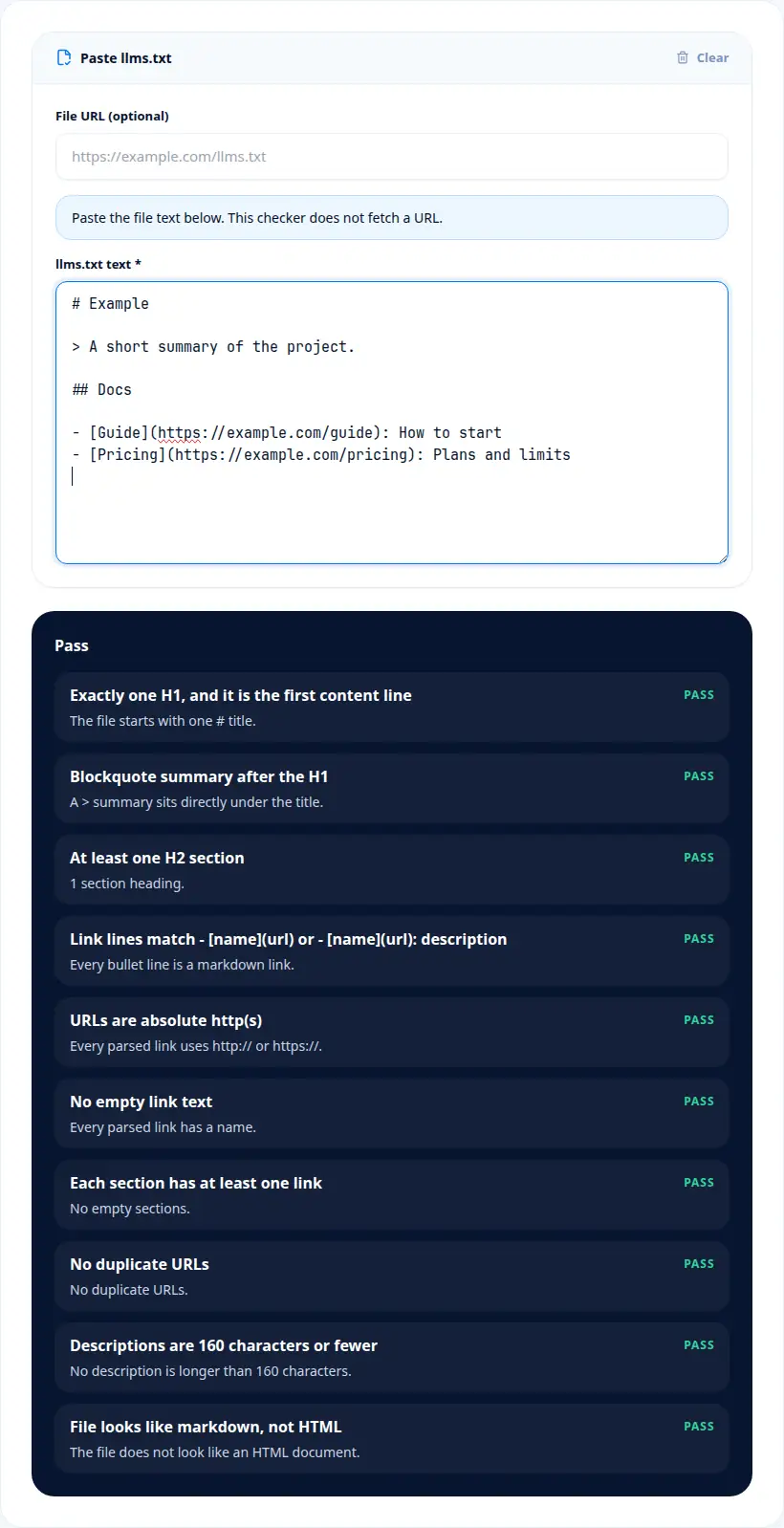
From the form
Language in the LLMs.txt Checker + Validator report
| Term | Meaning |
|---|---|
| H1 | The markdown title line. |
| Blockquote | The summary line starting with >. |
| Absolute URL | http or https. A path is relative and fails. |
| Line number | The line in the paste where a problem was found. |
| Pass with warnings | Required pieces are present, and at least one warning remains. |
On this tool
Severity, scope, and what LLMs.txt Checker + Validator skipped
A usable llms.txt file has an H1 title, a blockquote summary, H2 sections, and absolute http or https links with names. Line numbers in this checklist point at the pasted markdown, which is the same idea as a linter for that format.
A usable file has one H1 on the first content line, a blockquote summary under that title, at least one H2 section, and links written as a markdown list. URLs must be absolute http or https, and the link text cannot be empty. A missing summary is a warning. A missing title, a relative URL, or an empty link name fails.
H1 is one of the values LLMs.txt Checker + Validator puts on screen. The title is one heading on the first content line. A missing title fails. A second H1 is not the shape this file uses.
Read Summary on its own before you mix it with the other rows. The summary is a blockquote under the title. A missing summary warns. It does not by itself fail the file.
Links answers a narrower question than the headline number. Links are a markdown list with absolute URLs. A relative URL or an empty name fails, and the line number is shown. The checker does not request the URL to see if it loads.
Treat Warnings as a label with a specific job. Some issues are warnings. Repeated URLs, a long description, an empty section, and HTML-like text warn. Pass with warnings means the required title and links are present.
The URL box line is worth a full stop. A field for a file address. It is a note only. Paste the markdown. The box is not requested.
A section with no links, a repeated URL, a description longer than 160 characters, and a file that looks like HTML are warnings. The checker does not download the URL box and it does not invent a network score. Paste the file. Line numbers point at that paste.
If you remember one sequence from LLMs.txt Checker + Validator, remember the fields in the order they change a decision. H1 matters because The title is one heading on the first content line. In practice, A missing title fails. The mistake to avoid is this: A second H1 is not the shape this file uses. Summary matters because The summary is a blockquote under the title. In practice, A missing summary warns. The mistake to avoid is this: It does not by itself fail the file. Links matters because Links are a markdown list with absolute URLs. In practice, A relative URL or an empty name fails, and the line number is shown. The mistake to avoid is this: The checker does not request the URL to see if it loads. Warnings matters because Some issues are warnings. In practice, Repeated URLs, a long description, an empty section, and HTML-like text warn. The mistake to avoid is this: Pass with warnings means the required title and links are present. URL box matters because A field for a file address. In practice, It is a note only. The mistake to avoid is this: Paste the markdown. The box is not requested. After that, the checks are simple. The paste is markdown, not a URL. Failures were fixed at the line number. Relative URLs were changed to http or https. A missing summary was treated as a warning. The URL box was left as a note.
The worked example for LLMs.txt Checker + Validator, read as one scene, is this. Paste a file that starts with # Example, a blockquote summary, ## Docs, and a link to https://example.com/guide named Guide. The required rows pass. Leave the summary out and that row warns while the title and link can still pass. Change the guide URL to /guide. The check fails on that line because the URL is relative. The line number is the line in the paste, not a line on a server.
Keep LLMs.txt Checker + Validator as this step only. When the job moves on, the LLMs.txt Generator is the next page: LLMs.txt Generator writes an llms.txt markdown file from a project name, a summary, optional notes, and grouped links. The LLMs.txt Auditor covers a different piece of the same work: LLMs.txt Auditor scores the structure of llms.txt markdown you paste and shows the math behind the score.
Where LLMs.txt Checker + Validator fits
LLMs.txt Checker reads llms.txt markdown you paste and returns a pass, warning, or fail for the title, summary, sections, and links. It is for editors checking a file before they publish it. Failures include a line number. The optional file URL is not fetched.
LLMs.txt Checker reads markdown you paste and returns a pass, warning, or fail for the title, summary, sections, and links. Failures include a line number. The optional file URL is not fetched.
LLMs.txt Checker + Validator in order
Paste the llms.txt text. The file URL field is only a note.
Read the checklist. Each row is a pass, a warning, or a fail.
Use the line number on a failure to find that line in the paste.
Clear the box if you want to check a different file.
What LLMs.txt Checker + Validator returns
- A missing title, a relative URL, or an empty link name fails the check.
- A missing summary is a warning, not an automatic fail.
- The URL box does not download a file. Only the pasted text is checked.
Easy to misread LLMs.txt Checker + Validator
Typing a URL and expecting a download
Paste the file. The URL box is not fetched.
Treating a warning as a fail
A missing summary warns. A missing title fails.
Ignoring the line number
It points at the pasted line to edit.
Using HTML
The checker warns when the paste looks like HTML. This format is markdown.
On this tool
Questions after a LLMs.txt Checker + Validator run
Does the LLMs.txt checker download the file URL?
No. Paste the markdown. The URL field is not requested.
What fails the checklist?
A missing title, a relative URL, or a link without a name fails. A missing summary is a warning.
What does the line number mean?
It is the line in the text you pasted where that problem appears.
What does pass with warnings mean?
The file has the required title and links, and at least one warning such as a missing summary.