LLMs-full.txt Generator
Build llms-full.txt from page titles, URLs, and markdown, plus a short llms.txt index of the same pages. Copy or download both files.
Page 1
llms-full.txt
Enter a project name.
llms.txt index
The short index is built from the same pages.
Field note
JSON LLMs-full.txt Generator emits
Input
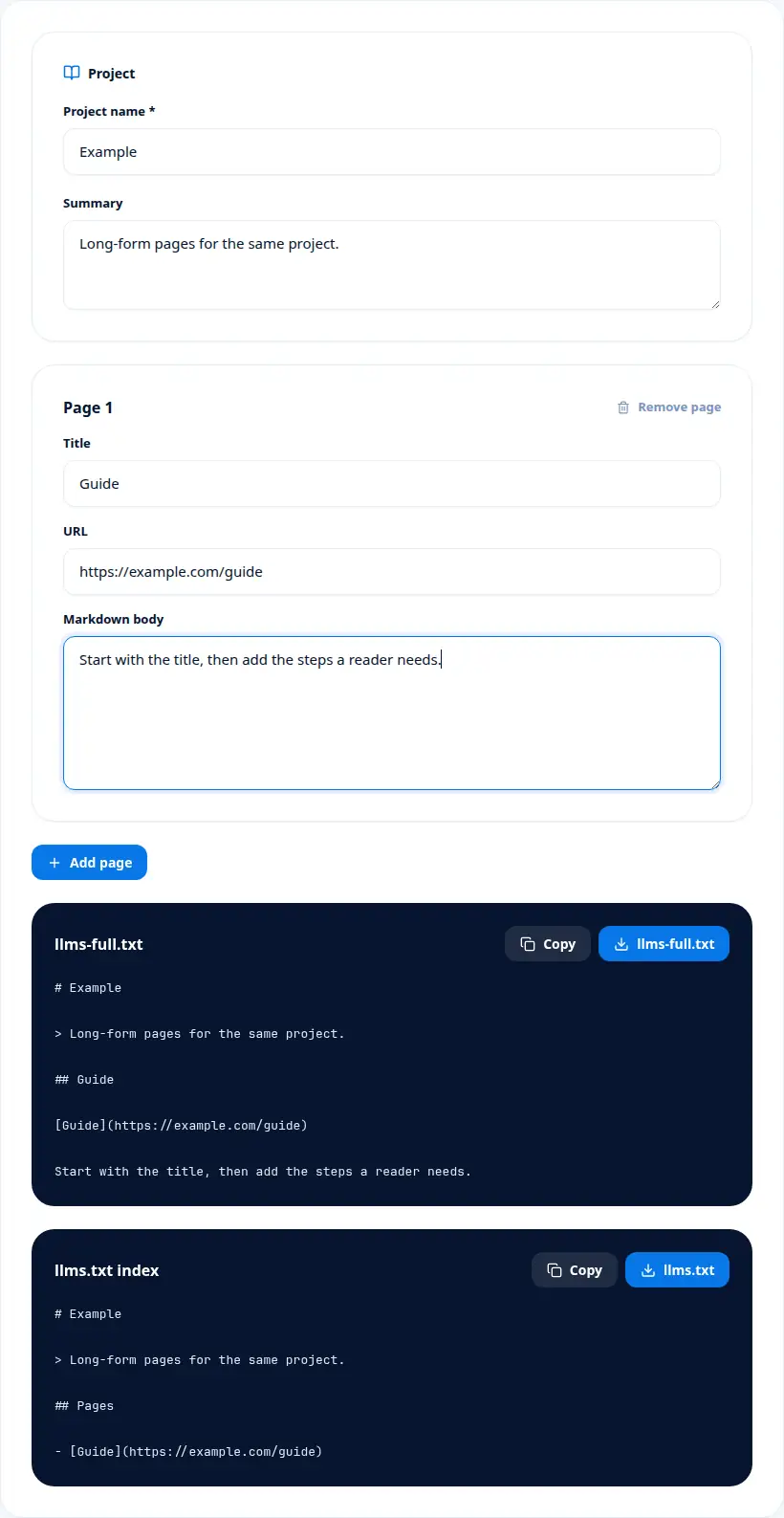
Project name Example, one page titled Guide at https://example.com/guide with a short markdown body. llms-full.txt contains the title, the link, and that body. The short llms.txt lists Guide under Pages. The guide URL was not downloaded.
What you should see
Add a second page with a URL but no title. That page is skipped in both files. Add the title and it appears in both.
Screenshot
The LLMs-full.txt Generator form
Detail
What the LLMs-full.txt Generator script contains
- 01
llms-full.txt contains each page title, URL, and the markdown you wrote.
- 02
The llms.txt index lists the same pages without the long bodies.
- 03
A page needs a title and a URL before it is included.
Read this
Properties LLMs-full.txt Generator asks for
- llms-full.txt
- The long file with page bodies.
- llms.txt index
- The short file listing the same pages.
- Pages heading
- The single H2 the short file uses for those links.
- Skipped page
- A row with no title. It is omitted.
- Markdown body
- The text you write for that page inside the full file.
Field note
Where LLMs-full.txt Generator markup belongs
llms-full.txt is the long companion to llms.txt. The short file is an index of links. The full file repeats those links and includes the page markdown so an assistant can read the content without opening each URL. Both files come from the same form.
The full file starts with the project title and the summary, then one section per page. Each section shows the title, the URL as a markdown link, and the markdown you wrote. A page with no title is skipped. A page that is included needs an http or https URL. The short file lists the same pages under one Pages heading.
Project name is one of the values LLMs-full.txt Generator puts on screen. The title of both files. It is required. It is not read from a live site.
Read Page title on its own before you mix it with the other rows. The heading for that page inside the full file. A page with no title is skipped. The title is what you type, not the HTML title of the URL.
Page URL answers a narrower question than the headline number. An absolute http or https link. A page that is included needs one. The URL is written into the file. It is not fetched.
Treat Markdown body as a label with a specific job. The content of that section. It is the text you type. It is not a scrape of the page.
The Short index line is worth a full stop. llms.txt lists the same pages. They sit under one Pages heading. The short file does not repeat the long bodies.
Update a page in the form and both files change together. The body is the markdown you type, not a download of the URL. Empty pages do not become sections. Publish the two files yourself. This page does not upload them.
If you remember one sequence from LLMs-full.txt Generator, remember the fields in the order they change a decision. Project name matters because The title of both files. In practice, It is required. The mistake to avoid is this: It is not read from a live site. Page title matters because The heading for that page inside the full file. In practice, A page with no title is skipped. The mistake to avoid is this: The title is what you type, not the HTML title of the URL. Page URL matters because An absolute http or https link. In practice, A page that is included needs one. The mistake to avoid is this: The URL is written into the file. It is not fetched. Markdown body matters because The content of that section. In practice, It is the text you type. The mistake to avoid is this: It is not a scrape of the page. Short index matters because llms.txt lists the same pages. In practice, They sit under one Pages heading. The mistake to avoid is this: The short file does not repeat the long bodies. After that, the checks are simple. Every kept page has a title and an absolute URL. The body is text you wrote, not a scrape. A title-less row was expected to be skipped. Both files were downloaded if you need both. You will publish the files yourself.
The worked example for LLMs-full.txt Generator, read as one scene, is this. Project name Example, one page titled Guide at https://example.com/guide with a short markdown body. llms-full.txt contains the title, the link, and that body. The short llms.txt lists Guide under Pages. The guide URL was not downloaded. Add a second page with a URL but no title. That page is skipped in both files. Add the title and it appears in both.
Keep LLMs-full.txt Generator as this step only. When the job moves on, the LLMs.txt Generator is the next page: LLMs.txt Generator writes an llms.txt markdown file from a project name, a summary, optional notes, and grouped links. The LLMs.txt Auditor covers a different piece of the same work: LLMs.txt Auditor scores the structure of llms.txt markdown you paste and shows the math behind the score.
Where LLMs-full.txt Generator fits
LLMs-full.txt Generator builds a long markdown file from a project name, a summary, and pages that each have a title, a URL, and a markdown body. It also writes a short llms.txt index of those same pages. Both files are created in the browser. You copy or download them.
LLMs-full.txt Generator builds a long markdown file from a project name, a summary, and pages that each have a title, a URL, and a markdown body. It also writes a short llms.txt index of those same pages. Both files are created in the browser. You copy or download them. The page bodies are not fetched.
LLMs-full.txt Generator in order
Enter the project name and an optional summary.
For each page, fill the title, the URL, and the markdown body.
Add another page for every extra document you want in the file.
Copy or download llms-full.txt and the shorter llms.txt index.
Easy to misread LLMs-full.txt Generator
Expecting the body to be fetched
You type the markdown.
Using a relative URL
Included pages need http or https.
Looking for a skipped page
No title means the page is left out.
Publishing only one file by accident
The form makes a pair. Download both if you want both.
From the form
LLMs-full.txt Generator questions
What two files does the full generator make?
llms-full.txt with the page bodies, and an llms.txt index of the same pages.
Are the pages fetched from their URLs?
No. The body is the markdown you type. The URL is only written into the file.
What is required before a page is included?
A project name, plus a title and an http or https URL on the page.
Can I add more than one page?
Yes. Use Add page for each extra title, URL, and markdown body.
Note
Before you paste LLMs-full.txt Generator
- Every kept page has a title and an absolute URL.
- The body is text you wrote, not a scrape.
- A title-less row was expected to be skipped.
- Both files were downloaded if you need both.
- You will publish the files yourself.