LLMs.txt Generator
Create an llms.txt file with a project title, a short summary, and grouped links. Copy the markdown or download it as llms.txt.
llms.txt
Enter a project name.
On this tool
What LLMs.txt Generator writes
- 01
The download is named llms.txt and uses H1, a blockquote, and H2 sections.
- 02
Descriptions are omitted, colon and all, when the description box is blank.
- 03
Empty link rows are left out.
Read this
When to open LLMs.txt Generator
- The project name is filled.
- The summary is one paragraph.
- Every kept link is http or https.
- Blank descriptions did not leave a stray colon.
- The file will be uploaded to /llms.txt by you, not by this page.
Detail
Build a file in LLMs.txt Generator
- 01
Enter the project name, a one-paragraph summary, and any extra notes.
- 02
Add a section heading, then links with a name, an http or https URL, and an optional description.
- 03
Add another section if the links belong in more than one group.
- 04
Copy the markdown or download it as llms.txt. Put that file at the site root yourself.
Detail
A finished LLMs.txt Generator example
Input
Project name Example, summary A sample project, notes Extra context for editors, section Docs, link Guide at https://example.com/guide with description How to start, and a second link About at https://example.com/about with a blank description. The file starts with # Example, a blockquote of the summary, the note paragraph, ## Docs, then a described link and a link with no colon.
What you should see
An empty link row is absent from the download. A relative URL such as /guide is not the form this file wants. Use https.
Screenshot
The LLMs.txt Generator form
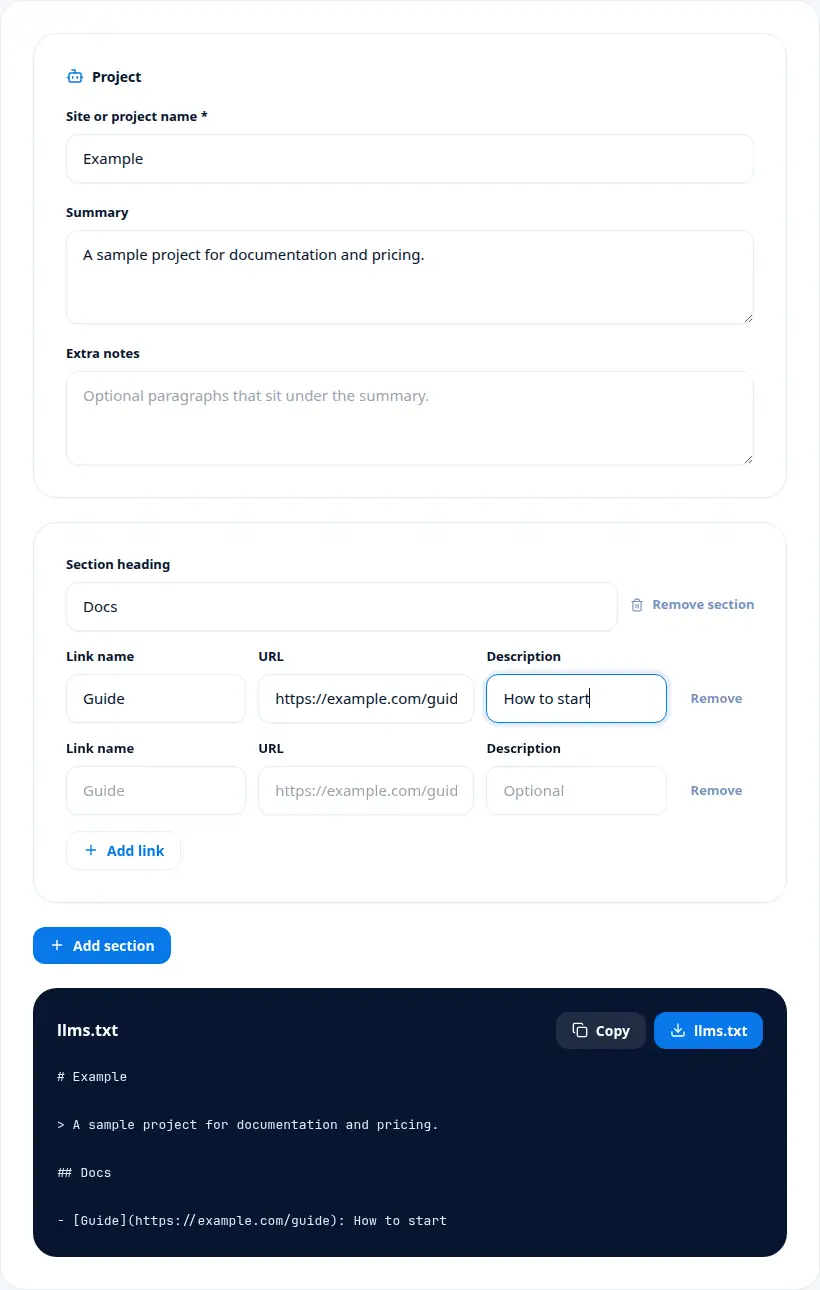
From the form
Decisions inside LLMs.txt Generator
llms.txt is a markdown file, usually at the site root, that points assistants at the pages you want them to read. The title is an H1, the summary is a blockquote, and each group of links is an H2 followed by markdown links. Notes sit under the summary as plain paragraphs.
Project name is one of the values LLMs.txt Generator puts on screen. The H1 of the file. It is required. An empty name does not produce a file. Use the public name of the site or project.
Notes answers a narrower question than the headline number. Plain paragraphs under the summary. They are optional. They are not H2 sections.
The Download line is worth a full stop. The browser saves llms.txt. Nothing is published for you. Upload the file to the site root after you download it.
If you remember one sequence from LLMs.txt Generator, remember the fields in the order they change a decision. Project name matters because The H1 of the file. In practice, It is required. An empty name does not produce a file. The mistake to avoid is this: Use the public name of the site or project. Summary matters because A blockquote under the title. In practice, One paragraph is the intended length. The mistake to avoid is this: Do not paste the whole homepage. Notes matters because Plain paragraphs under the summary. In practice, They are optional. The mistake to avoid is this: They are not H2 sections. Link row matters because A markdown link inside a section. In practice, Name and absolute URL are required for the row to be useful. A blank description drops the colon. The mistake to avoid is this: Relative URLs are the wrong shape for this file. Download matters because The browser saves llms.txt. In practice, Nothing is published for you. The mistake to avoid is this: Upload the file to the site root after you download it. After that, the checks are simple. The project name is filled. The summary is one paragraph. Every kept link is http or https. Blank descriptions did not leave a stray colon. The file will be uploaded to /llms.txt by you, not by this page.
Keep LLMs.txt Generator as this step only. When the job moves on, the LLMs.txt Checker + Validator is the next page: LLMs.txt Checker reads llms.txt markdown you paste and returns a pass, warning, or fail for the title, summary, sections, and links. The Sitemap to LLMs.txt covers a different piece of the same work: Sitemap to LLMs.txt turns pasted sitemap XML or a list of URLs into an llms.txt file.
The file starts with an H1 title, then a blockquote summary, then optional note paragraphs, then H2 sections of markdown links. Each link has a name and an absolute http or https URL. A description is added only when you type one, as a colon and the description after the link. An empty row is skipped.
Read Summary on its own before you mix it with the other rows. A blockquote under the title. One paragraph is the intended length. Do not paste the whole homepage.
Treat Link row as a label with a specific job. A markdown link inside a section. Name and absolute URL are required for the row to be useful. A blank description drops the colon. Relative URLs are the wrong shape for this file.
Publish the file at the site root so a person or an agent can request /llms.txt. The generator does not upload it. Keep the summary to one paragraph. The file is a guide to pages worth reading. It does not replace the sitemap or the page content.
The worked example for LLMs.txt Generator, read as one scene, is this. Project name Example, summary A sample project, notes Extra context for editors, section Docs, link Guide at https://example.com/guide with description How to start, and a second link About at https://example.com/about with a blank description. The file starts with # Example, a blockquote of the summary, the note paragraph, ## Docs, then a described link and a link with no colon. An empty link row is absent from the download. A relative URL such as /guide is not the form this file wants. Use https.
Where LLMs.txt Generator fits
LLMs.txt Generator writes an llms.txt markdown file from a project name, a summary, optional notes, and grouped links. It is for people publishing a short index of important URLs for language-model tools. You copy the markdown or download llms.txt. The file is built in the browser and no URL is fetched.
LLMs.txt Generator writes a markdown file from a project name, a one-paragraph summary, optional notes, and grouped links. You copy the markdown or download llms.txt. The file is built in the browser. No URL is fetched and nothing is stored on a server.
Easy to misread LLMs.txt Generator
Using a relative URL
The file should carry absolute http or https links.
Leaving a colon with an empty description
The generator omits the colon when the description is blank. Do not add one by hand unless you also add words.
Expecting an upload
Download gives you a file. You publish it.
Replacing the sitemap
llms.txt is a short reading list, not an exhaustive URL list.
Terms used by LLMs.txt Generator
- H1
- The markdown title, a line starting with #.
- Blockquote
- The summary, a line starting with >.
- H2
- A section heading, a line starting with ##.
- Absolute URL
- An http or https address, not a path.
- llms.txt
- The filename to publish at the site root.
On this tool
Practical questions on LLMs.txt Generator
What does the LLMs.txt Generator download?
A markdown file named llms.txt with an H1, a summary blockquote, optional notes, and H2 sections of links.
Does this generator fetch the URLs I type?
No. It only writes the file from the name, summary, notes, and links you enter.
Where should llms.txt be published?
At the root of the site so people and agents can request /llms.txt.
What happens if a link has no description?
The markdown link is still written, without a colon and description after it.